I Gave Claude Cowork 10 Scattered Files and Asked for a Client Report. Here's the 9-Page Document It Produced.

Every marketing agency, freelancer, and consultant has the same problem at the end of every quarter. The data exists. The meeting notes exist. The strategy documents exist. They're just scattered across folders, file types, and subfolders with no single document that tells the complete story.
Pulling them together into a coherent client report takes time: reading through everything, cross-referencing numbers with context, writing narrative sections that explain not just what happened but why, and formatting it into something that looks professional enough to send.
This week I tested whether Claude Cowork could do that job.
The Setup
I created a folder called Marketing Agency with 10 files across 5 subfolders:

Bloom Skincare — a Spring campaign brief with budget allocation, audience targeting, creative direction, and KPIs
FitLife Clinic — an expansion proposal for new markets
Meeting Notes 1 — two meeting note files from Bloom Skincare discussions across the quarter, capturing strategy decisions, budget changes, creative direction, and action items
Meeting Notes 2 — two meeting note files from FitLife Clinic discussions covering campaign restructuring and expansion planning
Meta Ads Report Q1 — three months of Meta Ads performance data in CSV format covering campaign names, ad sets, impressions, clicks, CTR, spend, conversions, CPC, and ROAS for January, February, and March 2026, plus one internal Q1 performance summary
These are the kinds of files that exist in any real agency folder. Different formats, different levels of detail, no single document connecting them.
The Prompt
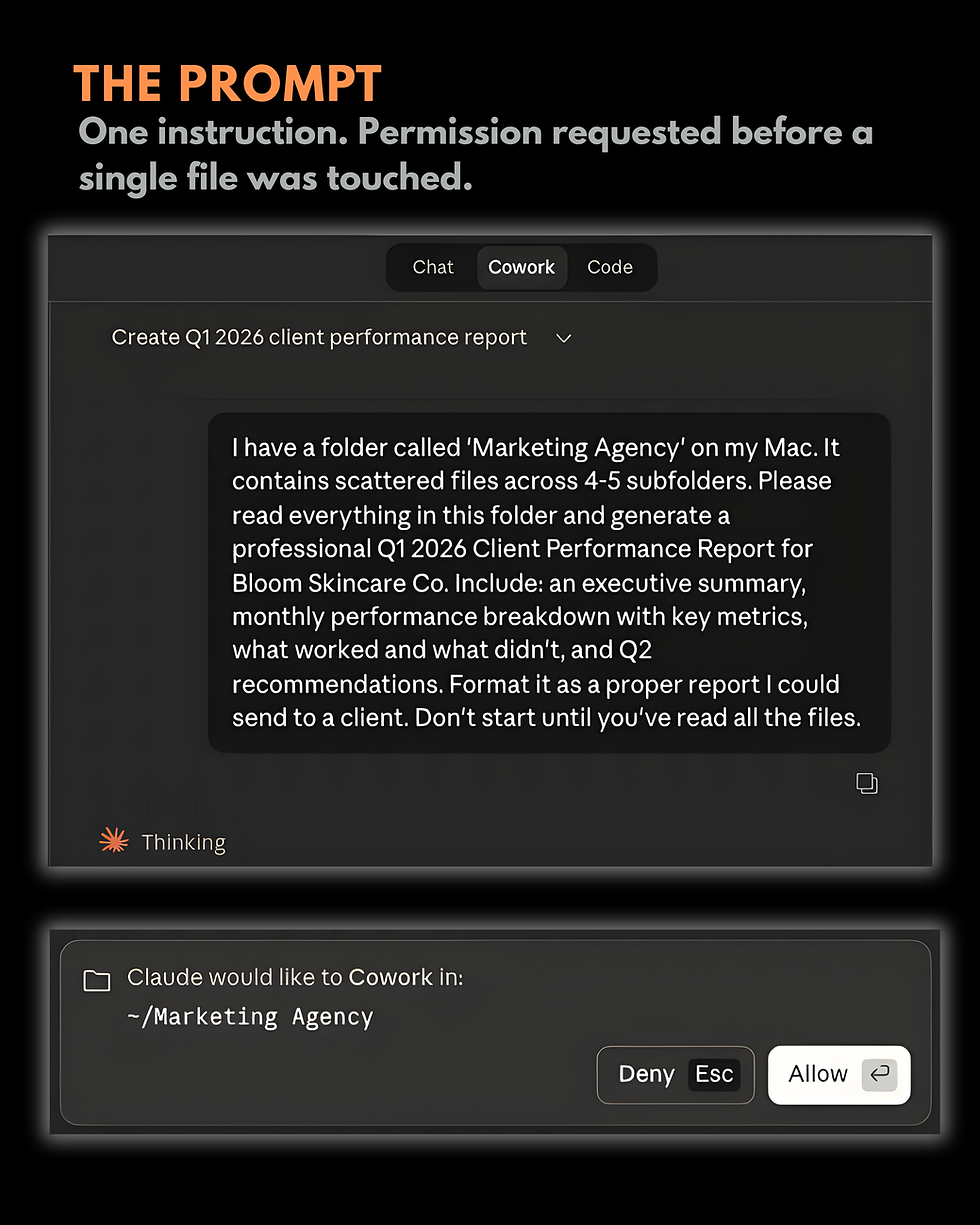
One instruction typed into Cowork:
"I have a folder called 'Marketing Agency' on my Mac. It contains scattered files across 4-5 subfolders. Please read everything in this folder and generate a professional Q1 2026 Client Performance Report for Bloom Skincare Co. Include: an executive summary, monthly performance breakdown with key metrics, what worked and what didn't, and Q2 recommendations. Format it as a proper report I could send to a client. Don't start until you've read all the files."
The last sentence matters. Telling Cowork to read everything before starting ensures it has the full picture before writing a word.
What Happened Before Any Writing Began

Permission first. Before accessing the folder, Cowork showed a prompt asking to Cowork in ~/Marketing Agency. Clicking Allow was required before it could read anything.
Folder picker when path not found. The default path wasn't where the folder was saved. Rather than guessing or throwing an error, Cowork opened a folder picker: "That path wasn't found at the default location. Let me open a folder picker so you can point me directly to it." One click, folder selected, and it continued.
Simultaneous file reading. Once in, it read 7 files at the same time across all subfolders. All three CSV files, both meeting note sets, the campaign brief, and the internal summary were loaded into context in parallel.
Checking best practices before writing. This was the step that stood out. After reading all the files, it said: "All files read. Now let me check the docx skill before writing the report." It consulted formatting best practices for Word documents before generating a single line of the report. The Context panel showed the docx skill loading. This extra step is what separated the output from a basic text summary.
The full task structure was visible in the Progress panel:
Request access to the Marketing Agency folder
Reading all files across all subfolders
Read the docx skill before writing the report
Generate Q1 2026 Client Performance Report
Save and present the final report
Steps 1 through 3 were complete before a single word of the report was written.
The Output: A 9-Page Formatted DOCX

The report opened with a clean cover page:
BLOOM SKINCARE CO. Q1 2026 Client Performance Report January – March 2026
Prepared by: Your Marketing Agency Report Date: April 9, 2026 Prepared for: Sarah Chen, Founder, Bloom Skincare Co.
Nine pages. Here is what the document contained, based on Claude's own summary of what it produced:
Executive Summary — a narrative overview of the full quarter, ROAS trajectory from 2.70x in January to 3.25x blended by quarter end, and total attributed revenue of approximately $61,694.
Q1 At a Glance table — monthly spend, impressions, CTR, conversions, CPA, and ROAS placed side by side across January, February, and March. A single table that makes quarter-on-quarter trends immediately visible.
Monthly breakdowns — individual sections for January, February, and March, each containing a campaign detail table with line-by-line ad set data pulled from the CSVs, and a narrative paragraph that pulled context from the meeting notes. The January section referenced the concern raised in the January meeting about the LA ad set underperforming relative to NYC, and connected it to the data showing lower CTR and ROAS for that audience.
What Worked / What Didn't — the retargeting audience dominance, the Rose Glow Serum product launch driving 22% of Q1 conversions, the LA creative fatigue visible by March, and the Reels format identified as an opportunity not yet tested at scale.
Q2 Recommendations — six specific priorities: retargeting budget scale-up, Reels ad format launch, LA creative refresh test, national audience expansion, Rose Glow Serum retargeting, and a campaign calendar framework.

You can view the actual report here: https://tinyurl.com/bloom-report-26
The Detail That Mattered Most
The numbers from the CSVs were accurate. But what distinguished the report from a data export was the synthesis with the meeting notes.
The February monthly breakdown referenced the budget increase to $5,500 approved in the January meeting, and noted that the Valentine's campaign had been planned around it. The March section connected the Spring campaign brief, including the creative direction and audience targeting agreed in February, to the performance results in March.
That contextual layer, the why behind the what, is what makes a client report useful rather than just factually correct. It's also the hardest part to write, because it requires holding multiple documents in mind simultaneously and understanding how they relate to each other.
Cowork did it by reading everything before writing anything, and then drawing connections across file types that a human analyst would normally spend time manually cross-referencing.
Honest Assessment
The report was client-ready in structure and formatting. The narrative sections were coherent and accurate. The tables were correctly populated.
There were areas that would benefit from human review before sending. The specific revenue figures in the executive summary were estimates calculated from ROAS and spend, and while the methodology was sound, those numbers should always be verified before presenting to a client. The Q2 recommendations were directionally correct but generic in places, and a human who knew the client relationship would add specificity.
The process also assumed the input files were accurate. Cowork synthesised what it was given. Garbage in, garbage out still applies.
But as a first draft of a structured, formatted, 9-page client report produced from 10 scattered files in under 10 minutes, the output was more useful than expected.
What This Actually Changes
The bottleneck in producing monthly client reports is rarely the writing itself. It's the assembly: finding all the relevant files, reading through them, cross-referencing data points, and building a narrative that connects them coherently.
Cowork handles the assembly. What remains is the human judgment: verifying the numbers, adding relationship context the AI doesn't have, and refining the recommendations based on what you know about the client that isn't in any file.
That division of labour, AI handles assembly and synthesis, human handles judgment and refinement, is where the practical productivity gain is. Not replacing the work, but removing the part of it that takes the most time without requiring the most skill.
Part 4 is coming. Next week I'm testing the Canva connector to create carousels directly from Cowork. Follow along for the honest experience.



Comments